Managing Total Rewards Statements as Headcount Grows
Total rewards statements are a data integration job dressed as communication. Here is where the process breaks as you grow, and how to fix it.
In every growing organisation, total rewards statements eventually stop being a project one person finishes over a long weekend. They become an operational problem that quietly takes far more time and attention than anyone planned. The early signals are subtle:
- a few more exceptions than last year
- a finance file that does not quite reconcile with the HRIS
- a manager asking why her team’s statements look different when their pay should be the same
By the time the problem is obvious, the process has usually been patched together in ways that make it harder, not easier, to fix.
The underlying issue is that total rewards statements are a data integration exercise wearing a communication costume. An accurate, personalised and readable statement pulls information from payroll, benefits, equity, pension and sometimes expense and recognition systems. It then combines all of it into something one person can understand. At small headcount, you can check the inputs by hand. As headcount grows, the same logic applies, but the manual checking route closes off faster than most teams notice.
This article looks at what changes as headcount grows, where statement processes tend to break, and what a programme that holds up at size looks like.
What goes into a statement, and why it grows
At its simplest, a total rewards statement shows employees the full value of what they receive, beyond their salary. For most organisations, that covers:
- base pay
- employer pension or provident fund contributions
- health and life insurance premiums
- equity grants and their estimated current value
- cash bonuses or variable pay
- the annual value of paid leave
What makes statements harder as headcount grows is not the number of employees itself. It is that the range of pay structures, employment types and local market variations tends to grow alongside headcount.
A company of 80 people probably has one or two offices, one benefits provider and a fairly consistent pay structure. A company of 800 may have:
- employees in five countries
- three pension schemes
- two types of equity plan
- a sales incentive structure that varies by territory
- legacy arrangements from an acquisition eighteen months ago
Each of those variations has to show up on the statement. Each one also adds a data source that needs to be connected and kept current.
The list of components also grows for a more deliberate reason. As total rewards programmes mature, organisations add new elements: recognition awards, learning budgets, flexible benefits allowances, mental health support. Each addition either appears on the statement or becomes an omission that makes the statement less useful. The richer the programme, the more value there is to show, and the harder the statement is to produce.
How complexity grows by stage
Statement management does not get harder in a straight line. There are clear thresholds where the nature of the challenge changes, and the process that worked at the previous stage stops being fit for purpose.
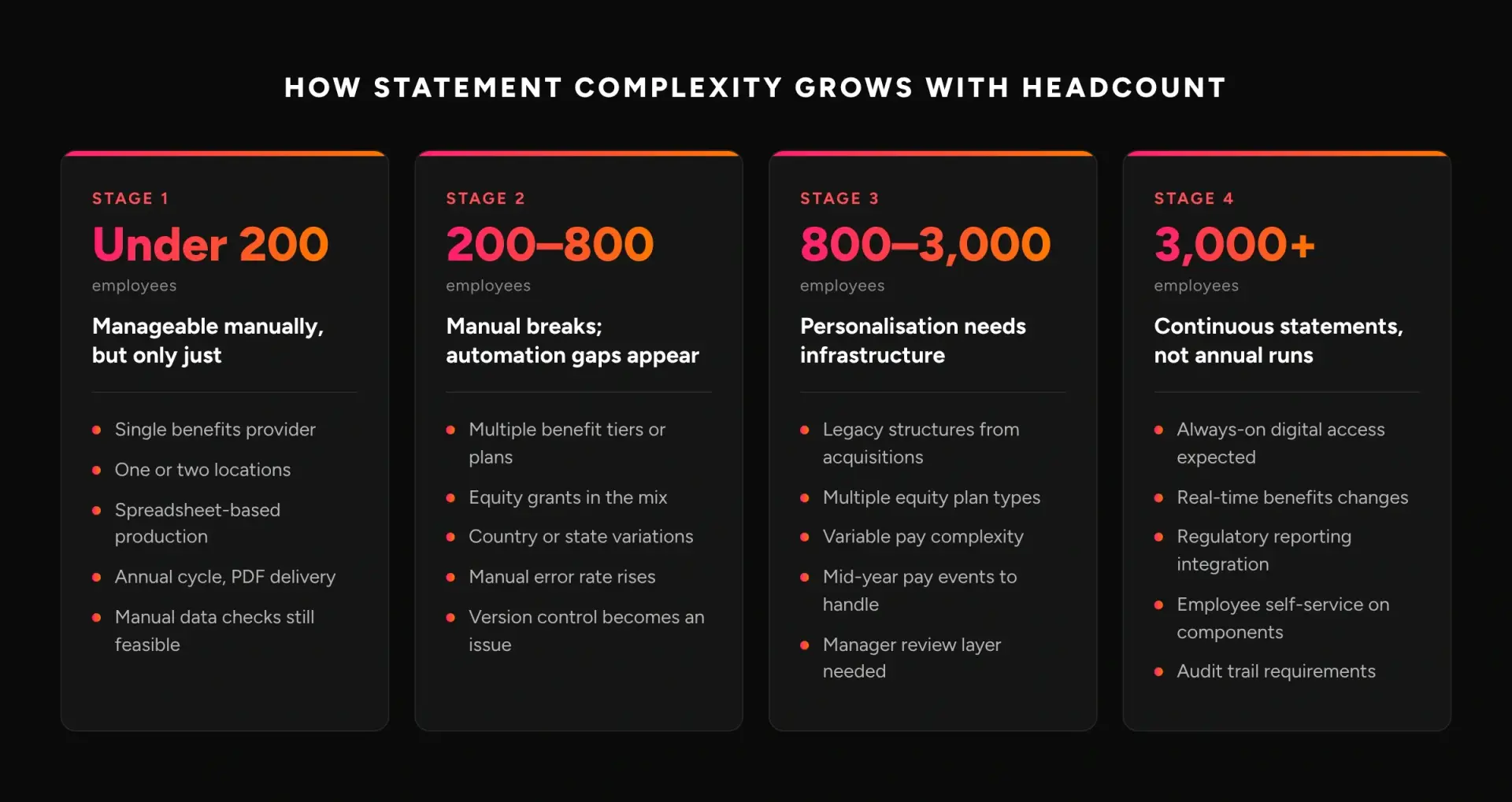
Most organisations are least prepared for the move from Stage 1 to Stage 2. A process that took three weeks, one HR generalist, a spreadsheet and a PDF template can stretch to three months. It only takes headcount doubling, the benefits programme adding a tier and someone handling equity for the first time. The temptation is to add more people to the process rather than rebuild it, which works until it doesn’t.
Where the process breaks
Most statement errors do not come from anyone making a large mistake. They come from small data mismatches that pile up across several systems, with no automated check to catch them before statements go out.
The benefits-to-payroll seam is the most common source of errors. Benefits and payroll systems are often run by different teams, updated on different schedules and lack a shared employee identifier. Suppose an employee changes their benefits election mid-year. The change may update correctly in the benefits platform but sit pending in payroll for a pay period or two. A statement built from both sources on different extraction dates will show inconsistent numbers.
Equity is a close second. Long-term incentive data usually lives in a separate equity platform, often with its own valuation method and update cycle. The value on a statement depends on three choices the HR team makes:
- which share price to use
- which vesting assumptions to apply
- which grant years to show
There is rarely a documented policy on those choices. When employees compare statements and see different equity values for what they believe are equivalent grants, the questions are hard to answer on the spot.
Departures and mid-year changes are the third pressure point. A statement showing pay at a single point in time is simple. It gets harder when the same calendar year includes a salary increase in February, a new equity grant in June and a benefits change in August. Then the production system has to handle effective-dated records accurately, and spreadsheets are poorly suited to that.
Why the statement matters beyond compliance
Employees tend to underestimate the value of non-cash pay when it is not shown next to base salary (source needed). That includes pension contributions, insurance premiums, equity and paid leave. Better manager communication will not fix this on its own. It is a visibility problem, and a structured statement solves it.
HR teams running statement programmes regularly see three consequences:
- Offer comparisons. Employees weighing a competitor’s offer often compare base salaries only, because that is the only figure both employers have made visible. A total rewards statement gives your employees a complete number to compare.
- Exit interviews. Organisations with statement programmes often find that departing employees, looking back, did not fully count benefits value when they weighed the offer they accepted (source needed).
- Underused investment. Organisations that invest in richer non-salary benefits get the least return when those benefits never appear in a statement the employee reads. Examples are generous pension matches, broad healthcare and learning budgets.
WorldatWork surveys total rewards professionals every year. It has repeatedly identified employee communication as one of the most under-used parts of total rewards programmes, relative to what organisations spend on them (source needed).
The most complex components
Equity. Stock options, RSUs, performance shares and SARs all have different valuation treatments and disclosure norms. A statement could value unvested equity at grant price, at current market price or at expected value under a standard vesting assumption. That gives three different numbers, all defensible. Employees who compare with peers may see inconsistencies that have nothing to do with their actual pay. The only way to manage this predictably is to set and document a consistent approach before statements go out.
Variable pay and sales incentives. Base salary is a known quantity. Target bonus, earned bonus and actual payout are three different figures, and employees and HR teams sometimes mix them up. The statement has to decide which one to show, and that choice shapes how employees read their total pay.
Benefits with employer-paid premiums. Health insurance, life insurance, critical illness cover and disability policies all carry employer premiums. Those premiums vary by employee with age, family status and plan choice. Getting them right needs a current data feed from each insurer, and matching that attributes each premium to the right employee record. This is manageable at 100 employees and genuinely difficult at 1,500.
Pension and retirement contributions. Defined benefit schemes need actuarially derived values for the annual statement. Defined contribution schemes need either the current account balance or the annual employer contribution, depending on the statement’s purpose. In markets where several pension arrangements coexist, each one has to appear and be attributed correctly. A common example is a mandatory state-linked scheme plus a voluntary employer top-up.
How Tallect automates statement data checks
The hard part of statement production is not the design. It is getting clean, reconciled data from several source systems into the right fields for the right employee, without manual lookups, before statements are generated.
- Cross-system anomaly detection. Tallect’s AI compares values across source systems before statements are generated. Some components appear in two feeds, such as payroll and benefits, or the HRIS and the equity platform. Where the values differ beyond an expected tolerance, the AI flags the record for review before it becomes a statement error.
- Change detection. The AI tracks which employee records have changed since the last statement cycle and highlights the differences, such as salary adjustments, new equity grants and benefits elections. Each statement then reflects the current position, without the team checking every record by hand.
- Complexity scoring. Not every record is equally complex. The AI flags employees with unusual arrangements for human review before the bulk run, so manual effort goes where it is needed. Unusual arrangements include multiple employment periods, out-of-band pay, non-standard equity grants and legacy benefits from acquisitions.
- Consistent component labels. Where business units have labelled pay components differently over time, the AI normalises them. For example, a “performance allowance” in one region and a “merit supplement” in another are treated as the same component. They do not appear as separate, confusing line items.
Building a process that holds up at size
Organisations that manage statements well at scale share a few traits. They are less about technology and more about early decisions on data ownership and process design.
- One source of truth for each component. This is not a merged spreadsheet someone updates before each run. It is a documented policy on which system is authoritative for each data type, plus a process that extracts from that system on a set schedule. When equity data always comes from the equity platform and never from a hand-kept list, the question of which number is right has a clear answer.
- A formal review step before distribution. At small headcount, whoever built the statements can review them by feel. At larger headcount, you need a structured review with defined exception criteria for what puts a statement on hold, plus a documented sign-off. This matters most the first time a new component appears in statements, when the production logic is most likely to hit an unforeseen edge case.
- Consistency in what is shown. If the format or components change every year, employees cannot tell whether their total rewards went up or down, because the baseline keeps moving. A stable format, with documented decisions on what each line item means, is a big advantage in handling employee questions at scale.

How Tallect handles statements as you grow
Tallect’s Total Rewards platform handles statement complexity without the HR team rebuilding the process at each growth stage:
- Multi-source data connectors. Pull pay, benefits, equity and recognition data from your existing systems into one reconciled view, without combining exports by hand.
- Effective-dated records. Statements show the correct position at any point in time, including mid-year changes, promotions and benefits elections, without manual adjustment.
- Component library. Define each pay element once, with its label, valuation method and display logic. It is then applied consistently across the whole employee population, whatever the headcount.
- Manager preview. HR teams can add a step where line managers see statements before employees do, with a built-in process for flagging exceptions.
- Always-on digital access. Employees can see their current total rewards position at any time, not just once a year. That reduces point-in-time queries and keeps the data current.
Key takeaways
- It is a data integration job. Total rewards statements are as much a data integration exercise as a communication one. Accuracy depends on clean, reconciled inputs from several systems, not just on design.
- The hardest step is moving off manual production. It is usually triggered somewhere between 200 and 500 employees, when the range of pay structures and locations makes manual checking impractical.
- Three error sources dominate:
- the benefits-to-payroll seam
- inconsistent equity valuation
- mid-year pay changes that the data extraction misses
- Non-cash pay is undervalued when unseen. Employees consistently undervalue non-cash pay when it is not shown explicitly. The statement is what makes the full cost of employment visible.
- Stability helps. A stable statement format, with documented decisions on what each line item means, is a big advantage in managing employee understanding.
- Two decisions prevent most errors at scale: a formal pre-distribution review, and one authoritative source for each pay component.
Frequently asked questions
What is a total rewards statement?
A total rewards statement shows employees the full value of what they receive from their employer, not just salary. It typically includes:
- base pay
- employer pension or provident fund contributions
- health and life insurance premiums
- equity grants and their estimated value
- bonuses or variable pay
- the annual value of paid leave
Why do total rewards statements get harder as a company grows?
The number of employees matters less than the variety that comes with growth. A larger company usually has more countries, pension schemes, equity plans, incentive structures and legacy arrangements from acquisitions. Each variation adds a data source that has to be connected and kept current.
At what headcount does manual statement production stop working?
The hardest transition usually comes between Stage 1 (under 200 employees) and Stage 2. A process that took one HR generalist three weeks can stretch to three months once headcount doubles, benefits add a tier and equity appears for the first time.
What causes most errors in total rewards statements?
Three things:
- the benefits-to-payroll seam, where the two systems are updated on different schedules
- inconsistent equity valuation choices
- mid-year changes that need effective-dated records, which spreadsheets handle poorly
How should equity be valued on a total rewards statement?
Unvested equity can be shown at grant price, at current market price or at expected value under a standard vesting assumption. All three are defensible, but they give different numbers. Choose one approach, document it, and apply it consistently before statements go out.
Should a statement show target bonus or actual payout?
Target bonus, earned bonus and actual payout are three different figures. The statement has to pick one and label it clearly, because that choice shapes how employees read their total pay.
Why are total rewards statements worth the effort?
Employees tend to underestimate non-cash pay when it is not shown alongside salary. A statement makes the full value visible. That matters when employees compare competing offers, and it helps you get a return on richer benefits.
How do you prevent statement errors at scale?
Set one authoritative source system for each pay component, and add a formal review step with defined exception criteria and a documented sign-off before distribution. These two decisions do the most to stop errors reaching employees.
Should the statement format change every year?
No. If the format or components change each year, employees cannot tell whether their total rewards went up or down. A stable format, with documented decisions on what each line item means, makes year-on-year comparison possible.
Can employees see their total rewards outside the annual statement?
Yes, with an always-on digital view. Employees can check their current total rewards position at any time, which reduces point-in-time queries and keeps the data current.
Total rewards statements that scale with you
Tallect connects your compensation, benefits and equity data into accurate, personalised statements, whether you have 200 employees or 20,000. See how it works on your own programme.