
Top 10 sales incentive platforms in 2026: an honest buyer's guide
A fair comparison of ten sales incentive and commission platforms, with the criteria, trade-offs and demo questions that matter for global teams.
What a sales incentive platform does
A sales incentive platform takes the work of running commission plans out of spreadsheets and puts it into one system. It holds the plan rules, the quotas, and the deal data. It works out who gets credit for each deal, calculates what each person has earned, routes payouts for approval, and hands the final figures to payroll. Good platforms also show reps how their pay was calculated.
You may see this category called sales commission software, incentive compensation management (ICM) software, or sales performance management (SPM). The names overlap. Some products focus on commission calculation, while others also cover territory planning, quota setting, and forecasting.
Most companies start looking when the spreadsheet stops coping. Typical triggers are more reps, more plan types, mid-quarter changes, deal data spread across systems, or pay in more than one country or currency. For teams that sell across countries, multi-entity payouts and different payroll calendars often come up early.
This guide compares ten of the best sales incentive software options for teams building a shortlist. Tallect publishes this guide, and Tallect's Sales Incentive module is one of the ten platforms reviewed. Every platform, Tallect included, is described with the same criteria and structure, including where it may not be the best fit. After the ten entries, a short, clearly labelled section sets out where Tallect's approach differs.
The platforms are listed in reverse alphabetical order, so the order does not reflect a ranking.
How we evaluated each platform
We used eight criteria that usually decide whether a platform works in practice, not just in a demo. Use them as a checklist for your own shortlist.
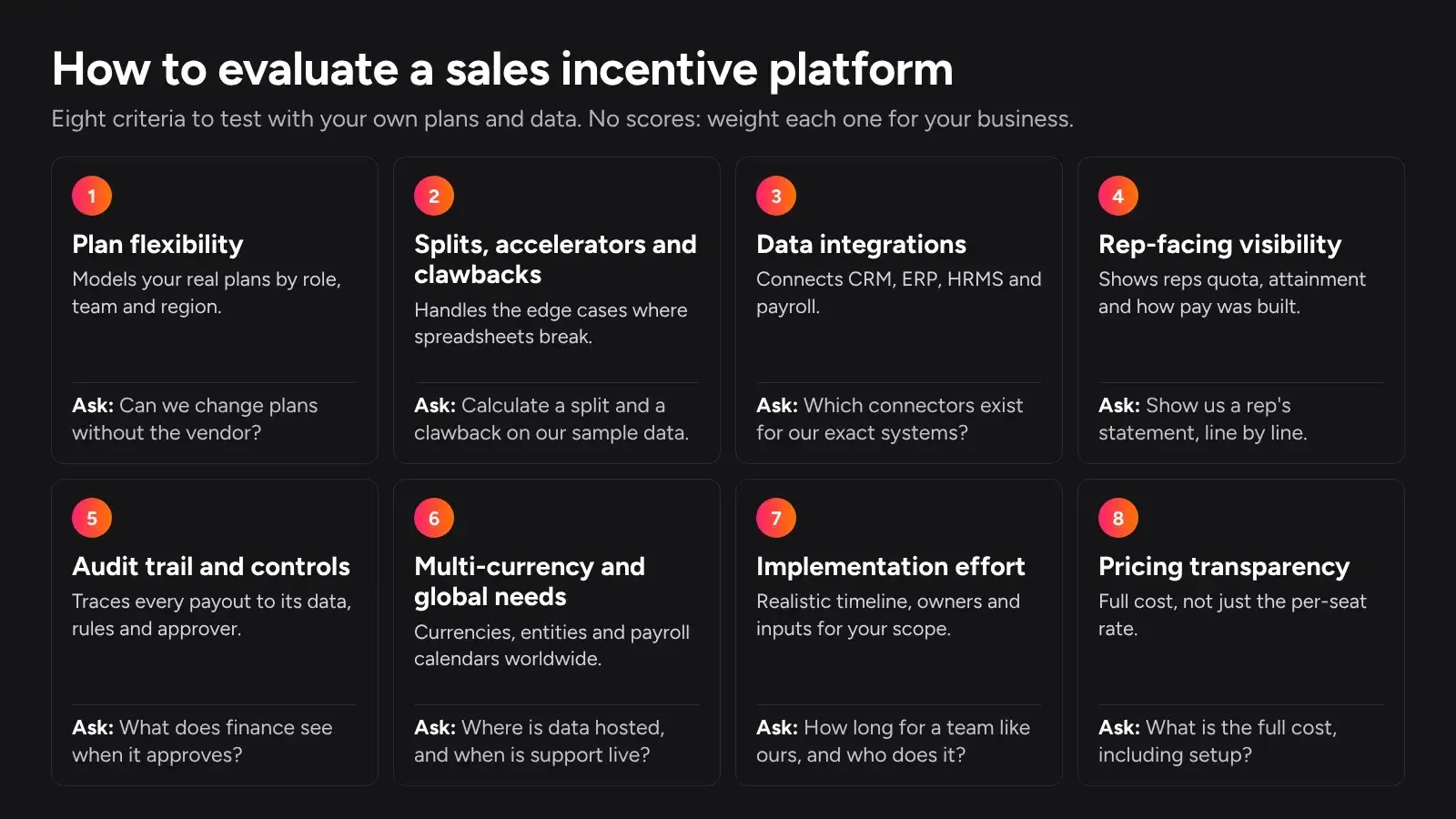
Plan flexibility
Can the platform model your real plans, not just a simple percentage? Look for tiers, thresholds, quota-based plans, team and individual components, and different plans for different roles and regions. Check whether your compensation team can change plans themselves, or needs the vendor for every change.
Splits, accelerators and clawbacks
These are where spreadsheets break first. Test how each platform handles:
- split credit between reps
- retroactive and marginal tiers
- accelerators above quota
- caps
- draws
- clawbacks on cancelled or unpaid deals
Ask to see each one calculated on your own sample data.
Data integrations
Most teams need four data connections:
- deal data from a CRM
- invoice or payment data from an ERP
- employee data from an HRMS
- a clean handoff to payroll
Confirm which connectors exist for your exact systems, how often data syncs, and what happens when source data changes after a payout.
Rep-facing visibility
Reps trust a plan they can follow. Look at what reps see: quota, attainment, earnings, and the deal-by-deal calculation behind each figure. Check whether reps can raise a query from inside their statement.
Audit trail and controls
Finance needs to know how every payout was derived, who approved it, and what changed since the last period. Look for approval workflows, change logs, and the ability to trace any payout back to its source data and rules.
Multi-currency and global needs
For teams that pay people in several countries, check support for:
- multiple currencies
- multiple legal entities
- different payroll calendars
- support hours across your time zones
- where your data is hosted
Implementation effort
Ask how long implementation takes for a company of your size and plan complexity, who does the work, and what your team must provide. Treat any timeline as an estimate until you have mapped your own plans and data.
Pricing transparency
Some vendors publish pricing and many do not. Either way, ask for the full cost: licences, platform fees, setup fees, connectors, support tiers, and how price grows with payees.
Best sales incentive software at a glance
This summary is a starting point for a sales commission software comparison. Read each entry below before you rule a platform in or out.
Platform | Best for | Company size fit | Standout strength | One thing to check |
|---|---|---|---|---|
Xactly | Enterprise revenue teams | Enterprise | Territory, quota, compensation and forecasting together | Total cost and rollout scope |
Varicent | Enterprises combining planning and compensation | Enterprise | Planning, quota and territory in one system | Implementation effort |
Tallect | Global teams wanting incentives inside a wider Total Rewards platform | Enterprise and global sales teams | Connected plan-to-payroll lifecycle | Pricing model for your scope |
SAP SuccessFactors Incentive Management | SAP-centred enterprises | Large enterprise | Rules engine and analytics | Contract structure and partner needs |
Salesforce Spiff | Teams already on Salesforce | Mid-market to enterprise | Close fit with Salesforce | Connector costs for other systems |
QuotaPath | Growing teams wanting published pricing | SMB to mid-market | Transparent, tiered pricing | Fit for complex multi-entity plans |
Qobra | CRM-centred teams wanting no-code setup | SMB to mid-market | No-code commission automation | Support across your time zones |
Performio | Enterprises with complex plans | Enterprise | Commission tracking and disputes | Implementation scope |
Everstage | RevOps-led teams wanting no-code plans | Mid-market to enterprise | Rep-level calculation breakdowns | Pricing for your payee count |
CaptivateIQ | Teams wanting control over plan logic | Mid-market to enterprise | Incentives, planning and modelling products | Setup fee and seat pricing |
Caption: Platforms in reverse alphabetical order. Size fit and strengths are general guidance based on each vendor's public positioning.
The 10 best sales incentive platforms
Each entry covers who it suits, key strengths, where it may not be the best fit, and pricing as publicly stated.
Xactly
Who it suits. Xactly is built for enterprise revenue teams, mainly sales operations, revenue operations, and compensation teams. It brings territory, quota, incentive compensation, and forecasting together in one platform, so it suits organisations that want those processes connected. It fits buying decisions where sales, finance, and compensation teams decide together.
Key strengths.
- Territory, quota, incentive compensation, and forecasting in one platform, which helps align planning with pay.
- Core commission features, including calculations, statements, and percentage-based plans.
- Reporting and analytics, plus CRM integration, so performance and payout data can be reviewed together.
- Built for the scale and governance needs of large revenue teams, where many stakeholders review and approve plans.
Where it may not be the best fit. Xactly's scope is designed for enterprise revenue organisations. Smaller teams, or teams that only need commission automation, may find a lighter tool easier to adopt. According to third-party listings, Xactly does not offer a free trial or publish pricing, so plan for a formal evaluation. Before you compare it with narrower tools, confirm the full scope of modules, implementation, and cost. Ask which capabilities are in the base product and which are separate modules, so your comparison is like for like. Global buyers should also confirm support coverage and data hosting for each region.
Pricing. Xactly does not publish pricing. Confirm with the vendor.
Varicent
Who it suits. Varicent suits large enterprises that want sales planning, incentive compensation management, and performance management in one platform. It describes itself as designed for complex enterprise environments. It fits organisations where territory design, quota setting, and pay are planned together by central sales operations, finance, and compensation teams, rather than by separate groups using separate tools.
Key strengths.
- A combined approach to sales planning and incentive compensation, so quotas, territories, and plans can be managed together.
- Commission management alongside quota planning and territory management, which reduces handoffs between planning and pay.
- Compensation plan modelling, so teams can test the cost and effect of plan changes before rollout.
- Reporting, analytics, and workflow management for reviewing performance and routing approvals.
Where it may not be the best fit. Varicent's breadth is aimed at complex enterprise needs. A mid-size company that only needs commission calculation may use little of the planning capability, and would be paying for scope it does not need. Ask for a realistic implementation timeline and resource plan for your scope. As with the other enterprise options, global buyers should confirm support coverage and data hosting for each region they operate in. If you only plan to use the compensation module at first, ask how pricing and implementation change for that narrower scope.
Pricing. Varicent does not publish standard pricing, and third-party listings show pricing on request. Confirm with the vendor.
Tallect
Who it suits. Tallect's Sales Incentive module is part of Tallect's wider Total Rewards platform. It is built for global, high-volume sales organisations with complex sales data, and for the compensation, finance, revenue operations, and sales teams who run them. It supports multiple countries and currencies, for SaaS, enterprise, inside, and channel sales.
Key strengths.
- One connected system for the incentive lifecycle: plan design, quota, CRM performance data, commission calculation, accelerators, approval, and payout handoff to payroll.
- Established plug-and-play connectors for CRM, HR, and finance systems, plus an open API and an SFTP connector for other sources, all with no extra charge from Tallect.
- First-time implementation delivered end to end by Tallect's product and implementation team, along with customisation, and six to eight weeks of hyper-care after go-live.
- Turns complex CRM data into logical achievement and payout calculations for new business, expansion, cross-sell, product, territory, individual, team, and hybrid plans.
- Accelerators: tiers, thresholds, bonuses, kickers, caps, floors, and super-accelerators.
- No-code, self-service plan design, management, and execution of commission schemes, with no support tickets needed. Teams can manage changes to criteria, quotas, and employee movement through the year.
- What-if analysis, plus analytics on attainment, payout cost, and plan effectiveness.
- Clear visibility for employees into quota, attainment, earnings, and how each figure was calculated, with traceable calculations and approval workflows for finance.
Where it may not be the best fit. Tallect is designed with global, complex sales organisations in mind, so a small team running a single, simple plan may not use its full breadth. Pricing is tailored and shared on request rather than published.
Pricing. Tallect offers a flexible, licence-based pricing model: per-seat pricing, or customised flat pricing for large enterprises. Tallect says its pricing stays consistent across a global workforce and stable over long-term contracts. Figures are shared on request.
SAP SuccessFactors Incentive Management
Who it suits. SAP SuccessFactors Incentive Management, formerly SAP Commissions, suits large enterprises, especially those already running SAP for HR, finance, or sales. It fits organisations with complex, high-volume incentive programmes and established enterprise IT processes.
Key strengths.
- A flexible rules engine for configuring incentive plans without custom coding, as described by SAP.
- Role-based dashboards for different users of the incentive process.
- Inquiry management for disputes, documents, and workflows.
- Embedded analytics on plan effectiveness, payment tracking, and dispute and error analysis.
- Real-time insight into payments and performance, including traceability and commission estimates.
Where it may not be the best fit. This is an enterprise suite, and it is sold on enterprise terms. SAP lists contracts of one to three years with pricing on request. Smaller companies, or those not otherwise invested in SAP, may find the scale and buying process more than they need. Ask whether SAP or a partner delivers the implementation, and factor that into your timeline and cost. If your CRM or HRMS is not SAP, ask how data integration is handled. SAP lists a separate data integration add-on, which belongs in your cost comparison.
Pricing. SAP lists the product with "price upon request", on one- to three-year contracts. A separate data integration add-on is also listed. Confirm with the vendor.
Salesforce Spiff
Who it suits. Salesforce Spiff is Salesforce's incentive compensation management product, sold as a paid add-on to Sales Cloud. It suits mid-market and enterprise companies that already run their sales process on Salesforce and want commissions in the same ecosystem. It can also suit companies that want to consolidate vendors and keep sales data and pay in one place.
Key strengths.
- A close fit for Salesforce customers, with deal data already in the same environment.
- Connectors to external systems beyond Salesforce, with more than 50 available, according to Salesforce's pricing page.
- Can be bought within Salesforce's wider sales performance management offering and sales editions.
- Published per-user pricing, which supports early budgeting.
Where it may not be the best fit. Spiff is positioned as an add-on to Sales Cloud, so it is most natural for companies already committed to Salesforce. Teams on another CRM should weigh that carefully. Each additional connector to a non-Salesforce system is priced separately, which matters if your ERP, HRMS, and payroll all need to feed in. Salesforce also states that per-user products need an annual contract, and that trial licences are not currently offered.
Pricing. Salesforce lists Spiff at US$75 per user per month, billed annually. Additional connectors are listed at US$250 per connector per month, and Premium Support at 30% of net price. Salesforce notes that these figures are for reference and that detailed pricing comes from its sales team.

QuotaPath
Who it suits. QuotaPath suits growing teams that want commission automation with clear, published pricing. Its lower tier is aimed at smaller teams using Salesforce or HubSpot. Its higher tiers add features for more complex compensation processes.
Key strengths.
- Published, tiered pricing, which makes early budgeting easier than with quote-only vendors.
- A Growth tier that adds team leaderboards, contests, and ASC 606 accounting support.
- A Premium tier that adds multi-level approvals, API access, and a native payroll integration, including Rippling.
- A clear upgrade path as plans become more complex, without changing platforms.
Where it may not be the best fit. QuotaPath's tiers are designed around growing teams. Large enterprises with many entities, currencies, and plan types should test how it handles that complexity before shortlisting it. Some capabilities, such as multi-level approvals and API access, sit in the higher tiers, so match your must-haves to the right tier when comparing costs. Teams outside its named CRM and payroll integrations should confirm data connections in a demo.
Pricing. QuotaPath publishes three tiers, billed annually:
- Essential: US$25 per user per month, plus a US$250 monthly platform fee.
- Growth: US$35 per user per month, plus a US$525 monthly platform fee.
- Premium: US$50 per user per month, plus a US$800 monthly platform fee.
Each platform fee covers the first five users. Confirm current figures and local-currency billing options with the vendor.
Qobra
Who it suits. Qobra is a Paris-based platform that describes itself as a no-code tool for automating commission calculations. Capterra describes it as suitable for companies with sales teams of more than 15 people who use a CRM. It fits small to mid-market teams that want to move off spreadsheets without a heavy implementation.
Key strengths.
- No-code setup, so commission plans can be configured without engineering support.
- Works with widely used CRM, ERP, and data warehouse tools, as described by the company.
- Core commission features, including calculations, statements, bonus tracking, and plan modelling.
- A free trial, according to Capterra's listing.
Where it may not be the best fit. Qobra is headquartered in Paris. Buyers with teams outside Europe should confirm support hours, data hosting location, and experience with payroll in their countries before committing. Large enterprises with many legal entities, currencies, and plan types should test how it handles that scale in a demo with their own data. Teams whose deal data does not live mainly in a CRM should also check how other sources, such as billing or collections, feed into calculations. A free trial makes this easier to test early, before a formal evaluation.
Pricing. Capterra lists a starting price of US$39 per user per month on a Basic plan, with a free trial available. Third-party listings can lag behind vendor changes, so confirm current pricing and currency with Qobra.
Performio
Who it suits. Performio positions itself for enterprise organisations, and it is also used by mid-size businesses. It suits teams with complex commission plans that need dependable calculation, tracking, and dispute handling at scale. It is a natural candidate when commission administration is a dedicated function, with sales operations or compensation analysts running it every cycle.
Key strengths.
- Core incentive compensation features, including commission calculation, commission tracking, and commission statements.
- Built-in dispute management, which keeps queries and their resolutions in one place instead of scattered across email threads.
- Flexible commission rules for plans that go beyond flat rates, such as tiered or role-specific structures.
- CRM integrations, including Salesforce, so deal data can flow into calculations without manual exports.
Where it may not be the best fit. Because Performio is aimed mainly at enterprises, smaller teams with simple plans may find it more than they need. Like other enterprise-focused platforms, it does not publish pricing or offer a free trial. Plan for a structured evaluation with your own data, not a quick self-serve test. Buyers with teams in several countries should confirm support coverage across their time zones, and the connectors for each country's HRMS and payroll systems. In the demo, ask to see a disputed payout taken from query to resolution, so you can judge how the workflow fits your team.
Pricing. Performio does not publish pricing, and third-party listings direct buyers to contact the vendor. Confirm with the vendor.
Everstage
Who it suits. Everstage suits mid-market and enterprise teams where revenue operations owns the commission process and wants to configure plans without engineering help. It is also aimed at finance teams that need audit-ready period closes, and at reps who want to see how their payout was built.
Key strengths.
- No-code plan building that covers tiers, accelerators, multi-role splits, and SPIFFs, as described by the vendor.
- A line-by-line breakdown for reps of how each payout was computed, with disputes raised from the statement.
- Timestamped audit trails and structured dispute workflows for finance.
- Named integrations including Salesforce, HubSpot, NetSuite and Workday, plus an open API and an SFTP connector for other sources.
Where it may not be the best fit. Everstage's pitch centres on RevOps teams running the platform themselves. Some companies would rather hand configuration to a services partner, or have no dedicated RevOps owner. They should check how much hands-on ownership the vendor expects. Everstage states a typical go-live of six to eight weeks. Treat that as the vendor's estimate, and test it against your own plan complexity and data quality. If your payroll or HRMS is not on its named list, confirm the connection method in a demo.
Pricing. Everstage describes its pricing as transparent and all-inclusive, with no separate services fee. It does not publish price figures on its site. Confirm with the vendor.
CaptivateIQ
Who it suits. CaptivateIQ suits mid-market and enterprise teams that want a high degree of control over how plans are built. Its product range covers incentives, sales planning and territory work, and a modelling layer for planning and incentives, so it can grow beyond commission calculation.
Key strengths.
- Commission logic that the vendor positions as configurable for complex or frequently changing plans.
- A wider product range, with separate products for incentives and for sales planning and territory work.
- Reporting included in the subscription, according to the vendor's pricing page.
- Tiered support options for managed services.
Where it may not be the best fit. Flexibility cuts both ways. A highly configurable platform rewards teams that have someone who can own plan configuration. A small team with simple plans may not need that depth, and may prefer a more guided setup. CaptivateIQ lists ASC 606 reporting as an add-on subscription, so teams that need it should include it when comparing costs. As with any platform, confirm the connectors for your CRM, ERP, and payroll systems in a demo.
Pricing. CaptivateIQ describes simple, per-seat pricing with a one-time setup fee. It says the price depends on the number of payees, plan complexity, and required integrations. It does not publish price figures and asks buyers to request a custom quote. Confirm with the vendor.
Where Tallect differs
Because Tallect publishes this guide, this section is our own view. It sets out where Tallect's approach differs from the patterns above. Statements about other vendors come only from their own public pages.
Buyer need | What we saw across this list | Tallect's approach |
|---|---|---|
Connecting CRM, HR and finance systems | Some vendors price connectors separately or tie integrations to higher tiers. Salesforce lists extra Spiff connectors at US$250 a month each, and QuotaPath's native payroll integration sits in its Premium tier. | Plug-and-play connectors for CRM, HR and finance systems, plus an open API and an SFTP connector, with no extra charge from Tallect. Any fees from the CRM provider depend on the client's own agreement with it. |
Implementation | Setup fees and services vary. CaptivateIQ, for example, lists a one-time setup fee. | First-time implementation delivered end to end by Tallect's product and implementation team, along with customisation, and six to eight weeks of hyper-care after go-live |
Pricing for a global workforce | A mix of per-user rates, platform fees, and quote-only contracts, including one- to three-year terms for SAP | Per-seat or customised flat pricing for large enterprises, consistent across a global workforce and stable over long-term contracts |
Changes through the year | Mid-year changes to quotas, criteria, and team moves often mean recalculation work | No-code, self-service plan design and changes without support tickets, built to absorb changes to criteria, quotas, and employee movement |
Testing plan changes | Some vendors offer planning and modelling as separate products. CaptivateIQ, for example, lists them alongside its Incentives product. | What-if analysis within the Sales Incentive module |
Incentives alongside total rewards | Most platforms here focus on sales performance and planning. SAP's sits within the wider SuccessFactors HR suite. | Part of a Total Rewards platform that also covers compensation, equity, benefits, recognition, culture and engagement, and hiring intelligence |
Caption: Tallect's own comparison of approaches. Confirm current terms with every vendor, Tallect included, before you decide.
How to choose the right platform
The best sales commission software for your company is the one that handles your actual plans, data, and regions with the least manual work. These steps take you from a long list to a confident decision.
- Document your plans first. List every plan, role, rate, tier, accelerator, split rule, draw, and clawback, with a worked example for each. This becomes your demo script and your acceptance test.
- Map your data sources. Note where deal data, invoices, collections, employee records, and payroll live, which system is the source of truth for each, and which connectors you will need.
- Set your must-haves. Use the eight criteria above to separate deal-breakers from nice-to-haves. For teams that sell across countries, multi-currency and multi-entity support are usually must-haves.
- Shortlist three vendors. Use the table to narrow the field, then read each entry for fit. Three is enough to compare properly without losing weeks to demos.
- Run a scripted demo. Send each vendor the same anonymised sample of reps, plans, and deal data. Ask them to calculate payouts live, including a split, an accelerator, a clawback, and a mid-quarter quota change.
- Check the rep and finance views. See exactly what a rep sees on their statement, and what finance sees when it approves a payout.
- Get the full cost in writing. Include licences, platform fees, setup, connectors, support, and how pricing grows with headcount.
- Pilot in parallel. Run the chosen platform alongside your current process for at least one cycle, and resolve every difference before switching off the spreadsheet.

Questions to ask vendors
Bring these to every demo, especially if you operate across several countries:
- Can you pay reps in multiple currencies and across multiple legal entities from one plan setup?
- How do payouts hand off to our payroll provider, and in what format?
- Which connectors exist today for our CRM, ERP, HRMS, and payroll, and which would need custom work?
- Where will our data be hosted, and can you meet our data residency requirements?
- What support hours do you offer in our time zone?
- Can you quote and invoice in our local currency?
- How long did implementation take for a customer with a similar number of payees and plans?
- What happens to past payouts when source data changes after a period closes?
A platform that answers these clearly, using your own data, is far more likely to work after go-live than one that only looks good in a standard demo.