Flexible Benefits Platform vs Spreadsheets: 8 Signs It's Time to Switch
Eight signs your team has outgrown spreadsheets for flexible benefits, what a platform changes, and how to make the move.
Most flexible benefits programmes do not start on a platform. They start on a spreadsheet. Someone in HR builds an allowance tracker, sets up a shared inbox for claims, and sends a file to payroll each month. For a small programme in one country, that is often the right call. It is cheap, quick to set up and easy to change.
The trouble is that spreadsheets do not grow with the programme. The work that used to take an afternoon starts to take a week when you add:
- a second country
- a new benefit
- a few hundred more employees
- a new rule for a particular grade
Errors creep in, questions pile up, and the people who understand the file become a single point of failure.
This guide sets out:
- eight signs that a team has outgrown spreadsheets for running flexible benefits
- what a flexible benefits platform does differently
- what manual admin really costs
- how to make the move
A rule of thumb to keep in mind as you read: if you recognise three or more of these signs in your own programme, it is time to start evaluating a platform. It is not a scientific threshold. It is a practical point at which the effort of switching is usually smaller than the effort of carrying on.
Why spreadsheets work at first
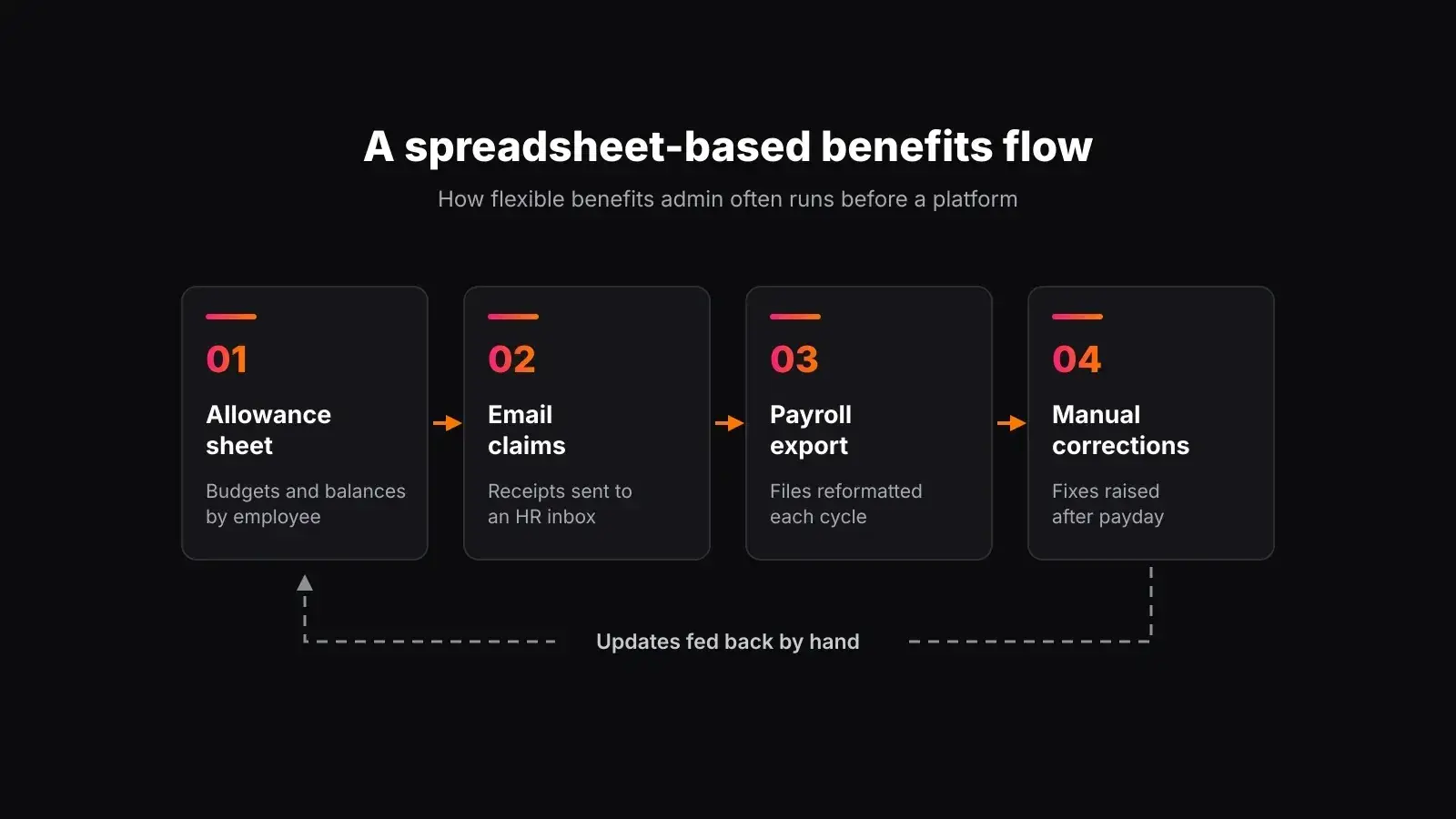
Spreadsheet-based flexible benefits admin usually has a handful of moving parts:
- An allowance tracker that lists each employee, their budget, what they have claimed and what is left.
- A claims inbox, where employees send receipts and requests, which someone reviews and approves.
- A payroll export that turns approved claims and benefit choices into deductions or payments each cycle.
- An eligibility list that records who gets which benefit, often by country, grade or contract type.
Around these sit email threads, a policy document, and a few people who know how it all fits together.
This setup works well in some situations, and it is worth being honest about that. Spreadsheets are a sensible choice when the programme:
- runs in one country
- offers a small number of benefits
- has a clear owner
- covers a headcount that one or two people can manage
They cost nothing extra, everyone knows how to use them, and you can change a rule in minutes. For a pilot, or a new programme where you are still learning what employees want, a spreadsheet lets you experiment before you commit to a system.
Spreadsheets also force useful discipline. To build one, you have to write down your budgets, your eligibility rules and your approval steps. That work is not wasted when you move to a platform. It becomes the basis of your requirements.
The problems start when the programme outgrows the conditions that made spreadsheets work. The signs below are the most common ways that shows up.
Sign 1: No single version of the truth
What it looks like day to day. There is a master allowance file, but there are also copies:
- one per country
- one that finance downloaded last month
- one someone saved to their desktop to fix a formula
Each month, someone merges updates by hand. When an employee asks how much allowance they have left, two people can give two different answers, and both can point to a file.
Why it matters. When nobody is sure which file is right, every decision takes longer and every number needs checking. Errors made in one copy do not reach the others, so mistakes survive for months. The risk grows with each country and each person who touches the file. It also makes the programme fragile: if the person who does the merge is away, the process stalls.
What a platform does instead. A flexible benefits platform keeps one record of each employee's budget, choices and claims. HR, finance and the employee all see the same data, updated as things happen, so there is nothing to merge. Changes are made once and apply everywhere.
Self-check: if two people pulled your allowance balances today, would they get the same numbers?
Sign 2: Claims pile up
What it looks like day to day. Employees email receipts to a shared inbox or to a named person in HR. That person then has to:
- open each one and check it against the policy
- log it in the tracker
- ask for any missing details
- chase approvals from managers
Claims sit in the inbox when the reviewer is busy or on leave. At month-end there is a rush to clear the backlog before the payroll cut-off.
Why it matters. Slow reimbursement is one of the fastest ways to make a benefit feel like a hassle. Employees who wait weeks for their money, or have to send the same receipt twice, lose trust in the programme. For HR, inbox claims are hard to track, easy to lose and almost impossible to report on. Receipts sitting in email also create a data privacy concern, which Sign 7 covers.
What a platform does instead. A platform gives employees a single place to submit claims, attach receipts and see the status of each request. Approval rules route claims to the right person automatically. Approved amounts flow to payroll or a payment method without being re-keyed. Some platforms use benefits cards, so certain spending does not need a claim at all.
Self-check: how many claims are sitting in your inbox right now, and how old is the oldest one?
Sign 3: Payroll needs manual fixes
What it looks like day to day. Each cycle, someone exports benefit choices and approved claims from the spreadsheet, reformats them for each payroll provider and sends them over. Payroll re-keys some of the data. After payday, someone compares what was paid with what should have been paid, and raises corrections for the next cycle.
Why it matters. Every manual step between the benefits file and payroll is a chance for a mistake. An error in a deduction or reimbursement goes straight into someone's pay, which is visible, personal and slow to fix. Corrections create:
- extra work for payroll
- extra questions for HR
- in some countries, changes to how a payment is taxed
Tax treatment of allowances varies by country, so check local rules and take advice.
What a platform does instead. A platform connects to payroll, through a direct integration or a standard file. Payroll receives the same data that employees and HR see. Reconciliation becomes a check rather than a rebuild, and corrections are tracked in the system instead of in email.
Self-check: how many hours did your team spend preparing and correcting payroll data for benefits last month?
Sign 4: Rules live in people's heads
What it looks like day to day. The policy says one thing, but the real rules are more detailed. For example:
- a higher allowance for a certain grade
- a different benefit for part-time staff in one country
- a waiting period for new joiners
- a change when someone has a child or moves location
These rules are applied by hand, by the people who remember them. When someone joins, leaves, is promoted or transfers, the spreadsheet is updated only if someone notices.
Why it matters. Rules applied from memory are applied inconsistently. Some employees get benefits they are not entitled to, and others miss out on ones they are. Both cost money, and the second also damages trust. When the people who know the rules leave, the knowledge goes with them. Inconsistent treatment can also raise fairness concerns that are hard to explain after the fact.
What a platform does instead. A platform stores eligibility rules as settings, based on data such as country, grade, contract type, length of service and life events. When an employee's details change in the HR system, their eligibility updates automatically. The rules are written down in one place, so they can be reviewed, audited and changed deliberately.
Self-check: could someone new to your team apply every eligibility rule correctly using only what is written down?
Sign 5: Employees can't see their balance
What it looks like day to day. Employees cannot check their allowance balance, see what they chose last year or understand what is available to them. So they ask. Every week, HR answers the same questions by email and chat:
- How much is left?
- What counts as an eligible expense?
- When does the window close?
- Was my claim paid?
Why it matters. Answering questions takes time, but the bigger cost is what happens when employees do not ask. People who cannot see their options tend to use fewer of them. Allowances go unspent, benefits go unused, and the employer pays for a programme employees do not value. A flexible benefits programme only works if employees understand their choices.

What a platform does instead. A platform gives each employee a personal view of their benefits, usually on a phone as well as a laptop:
- their budget
- what they have spent
- what they have chosen
- what is still available
Employees can make or change choices themselves, within the rules the employer sets. Many routine questions disappear, because the answer is already on screen.
Self-check: can every employee see their own benefits balance today without asking HR?
Sign 6: Finance sees spend too late
What it looks like day to day. Finance gets a summary of benefits spend after payroll closes, often weeks after the money was committed. Budget against actual is calculated by hand, by country, in another spreadsheet. Month-end accruals for claims submitted but not yet paid are estimates, because nobody knows exactly what is sitting in the inbox.
Why it matters. When spend is only visible after the fact, finance cannot manage it:
- overspends are found too late to correct
- underspends are found too late to redirect
- forecasts for the next plan year rest on incomplete data
It also weakens the case for the programme. If you cannot show what benefits cost and how they are used, it is hard to defend the budget.
What a platform does instead. A platform records budgets, choices and claims as they happen. Spend can be tracked against budget at any time, and broken down by country, benefit or employee group. Finance can see committed spend before payroll runs, which makes accruals and forecasts more reliable.
Self-check: could finance tell you this month's benefits spend against budget, by country, before payroll closes?
Sign 7: Audit and privacy worries
What it looks like day to day. Benefits files hold names, salaries, family details and sometimes health-related information. They:
- sit in shared folders
- travel as email attachments
- get downloaded to laptops
Access is controlled by whoever shares the link. When someone changes a number, there is no record of who did it or why. Receipts with personal details sit in inboxes indefinitely.
Why it matters. This is the sign with the highest stakes. A file sent to the wrong person, or a shared folder with access set too wide, can expose sensitive employee data. Without an audit trail, it is hard to answer an auditor's question or investigate a mistake.
Data-protection rules vary by country, and can set specific requirements for how employee data is stored, accessed and kept. Check your obligations with your data-protection and legal advisers.
What a platform does instead. A platform stores data in one controlled system, with access set by role, so people see only what they need. Changes are logged with who made them and when. Before you choose a platform, ask for independent security certifications, and for details of where data is stored and how access is managed.
Self-check: if an auditor asked who changed an employee's allowance last quarter, and why, could you answer?
Sign 8: Every new country means a new sheet
What it looks like day to day. When the company opens in a new country, adds a benefit or changes a rule, the spreadsheet has to be extended. That means new tabs, new columns, new formulas, new currency conversions and new payroll formats. Each change is built by hand, tested by hand, and understood by fewer people than the last.
Why it matters. A spreadsheet that grows by adding tabs eventually becomes too complex to trust:
- Each new country adds a new set of rules, a new currency and a new payroll process to the manual work.
- Expansion plans start to depend on how much the benefits team can absorb, rather than on what the business needs.
- Because every country is set up differently, comparing benefits across countries gets harder.
What a platform does instead. A platform lets you add countries, benefits and rules as configuration within one framework, with local currencies and local choices where needed. A consistent global structure makes it easier to compare spend and take-up across countries, while still allowing local variation.
Self-check: how long would it take you to add a new country to your flexible benefits programme today?
Spreadsheets vs a platform
The table below summarises how the two approaches compare across the areas covered by the eight signs.
Area | With spreadsheets | With a platform |
|---|---|---|
Source of truth | Several files and copies, merged by hand | One record per employee, shared by HR, finance and employees |
Claims | Emailed receipts, manual logging and chasing | Online submission, rule-based approval and status tracking |
Payroll | Exports reformatted and re-keyed each cycle | Integration or standard files from the same data |
Eligibility | Rules applied by hand, from memory | Rules stored as settings and applied automatically |
Employee view | Questions to HR to check balances and options | Personal view of budget, choices and claims |
Finance visibility | Spend known after payroll, budget tracked by hand | Spend tracked against budget as it happens |
Data security and audit | Shared files, link-based access, no change log | Role-based access and a record of changes |
Adding countries | New tabs, formulas and payroll formats | New configuration within one framework |
Cost to start | No extra software cost | Subscription and implementation costs |
Caption: A general comparison. What a platform delivers depends on the product, the setup and the quality of your data and policies.
A platform is not a cure for everything, and it is worth being clear about what it does not fix on its own:
- An unclear policy. A platform will apply unclear rules faster.
- Incomplete or out-of-date employee data. The platform will inherit the same gaps.
- No owner. If nobody owns the programme, a new system will drift the same way the spreadsheet did.
The teams that get the most from a platform usually fix these three things first, or at least alongside the move.
To check where you stand, run through the eight signs below. If you answer "no" or "not sure" to three or more, use the plan later in this guide to start evaluating a platform.
Sign | Ask yourself |
|---|---|
1. No single version of the truth | Would two people pulling our balances get the same numbers? |
2. Claims pile up | Can we say how many claims are waiting and how old they are? |
3. Payroll needs manual reconciliation | Does benefits data reach payroll without re-keying? |
4. Eligibility rules live in people's heads | Are all our eligibility rules written down and applied the same way? |
5. Employees can't see their own balance | Can employees check their balance without asking HR? |
6. Finance sees spend too late | Can finance see spend against budget before payroll closes? |
7. Audit and data privacy worries | Can we show who changed what, and control who sees what? |
8. Every new country means a new sheet | Could we add a country without rebuilding our files? |
Caption: A quick self-check. Three or more "no" or "not sure" answers suggest it is time to evaluate a platform.
What manual admin really costs
The direct cost of spreadsheets is close to zero, which is why they are so easy to keep. The real cost is the time people spend running them. That time rarely appears in a budget, because it is spread across HR, payroll and finance, a few hours at a time.
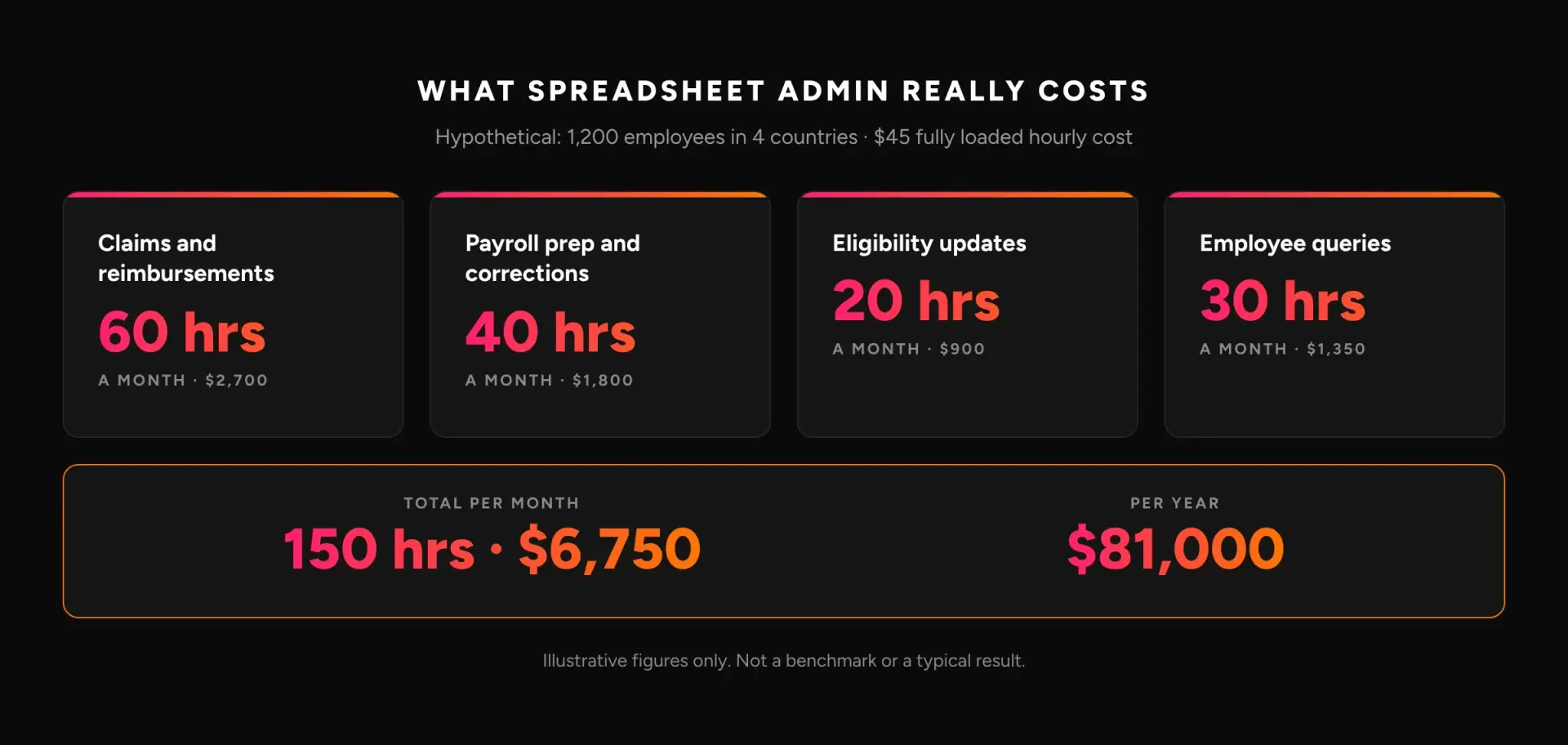
Here is one illustrative way to estimate it. All the figures below are hypothetical. They are not a benchmark or a typical result, and your own numbers will differ.
Imagine a company with 1,200 employees in 4 countries, running a flexible allowance programme on spreadsheets and email. Each month, its team spends an illustrative:
- 60 hours processing claims and reimbursements
- 40 hours preparing and correcting payroll data
- 20 hours updating eligibility for joiners, leavers and changes
- 30 hours answering employee questions
That adds up to 150 hours a month. At an illustrative fully loaded hourly cost of $45, those 150 hours cost $6,750 a month. Over 12 months, that is $81,000 a year spent on admin rather than on improving the programme.
Task | Illustrative hours per month | Illustrative monthly cost |
|---|---|---|
Claims and reimbursements | 60 | $2,700 |
Payroll preparation and corrections | 40 | $1,800 |
Eligibility updates | 20 | $900 |
Employee queries | 30 | $1,350 |
Total | 150 | $6,750 |
Caption: Illustrative figures only, using a hypothetical hourly cost of $45. They are not a benchmark or a typical result.
This example leaves out costs that are harder to count:
- payroll corrections
- employees who give up on a benefit
- slow answers to audit questions
- the risk of a data incident
- losing the people who hold the process together
A platform changes the shape of this work rather than removing it. Claims, eligibility and payroll data move into one system with rules, so routine tasks need less manual handling, and employees can answer many of their own questions. Time shifts towards reviewing exceptions, improving the programme and analysing how benefits are used.
To build your own business case, track your team's actual hours for a month. Then weigh them against the subscription and implementation costs that vendors quote you.
How to move off spreadsheets
Moving from spreadsheets to a platform is as much a policy and data project as a software project. These steps help you switch without disrupting pay or benefits.
- Agree the owner and goals. Name one person accountable for the programme and the move. Agree what success looks like, such as faster claims, fewer payroll corrections, better take-up or clearer spend reporting.
- Clean and map your current data. Bring together every file, tab and list. Remove duplicates, fix gaps and confirm current balances, so you know exactly what you are moving.
- Document eligibility and policy rules. Write down every rule, including the ones that exist only in people's heads. Resolve conflicts, and decide which exceptions to keep.
- Decide what to standardise globally and what stays local. Agree a common structure, such as budget logic, approval steps and categories. Decide where local benefits, currencies and rules need to differ by country.
- Set requirements and build a shortlist. Turn steps 1 to 4 into a list of must-haves and nice-to-haves, then shortlist platforms that fit your countries and benefits. For example, Tallect's Benefits & Insurance module offers:
Whichever platforms you consider, run the same scripted demo with each one. - Standard and Flex benefit options, with a spending account or wallet
- centralised budget and spend management
- a globally consistent benefits framework that stays regionally compliant
- Plan payroll and HRIS integration. Agree how employee data will flow in from your HR system, and how benefits data will flow out to each payroll provider. Involve payroll early, because this is where most of the risk sits.
- Run a parallel cycle. Run at least one cycle on both the spreadsheet and the platform. Compare the results line by line before you switch off the old process.
- Communicate to employees. Explain what is changing, when, and how employees will check balances, make choices and submit claims. Give them a simple guide and a contact for questions.

Time the move around your benefits calendar:
- Launch just before an enrolment window or plan year start. That gives employees a natural reason to log in.
- Avoid launching mid-way through a busy claims period, which adds risk.
After go-live, keep the old spreadsheets read-only for a while, so you can answer questions about past balances. Agree with your advisers how long records need to be kept.
Frequently asked questions
Can you run flexible benefits on spreadsheets?
Yes, and many teams do, especially when the programme covers one country, a few benefits and a headcount that one or two people can manage. Spreadsheets are cheap, flexible and quick to change, which makes them a good fit for a pilot or a new programme.
They become harder to rely on as you add countries, rules and employees. Manual work, errors and data risks grow with each addition.
When should you switch from spreadsheets to a flexible benefits platform?
Switch when the effort and risk of manual admin start to outweigh the cost of a platform. A practical rule of thumb is to start evaluating when you recognise three or more of the eight signs in this guide, such as:
- multiple file versions
- claims piling up
- manual payroll fixes
Start before a major change, such as entering a new country, so you are not rebuilding the spreadsheet under pressure.
What are the risks of managing benefits in spreadsheets?
The main risks are:
- Errors. Manual steps between files, claims and payroll create chances for mistakes in pay.
- Data exposure. Sensitive employee data in shared files and inboxes is harder to protect, and there is usually no record of who changed what.
- Dependence on a few people. If the people who understand the file leave, the programme can stall.
Data-protection rules vary by country, so check your obligations with your advisers.
How long does it take to move from spreadsheets to a flexible benefits platform?
It depends on:
- the number of countries
- the benefits in scope
- the integrations you need
- how clean your data is
A single-country allowance programme is usually simpler than a multi-country programme with payroll and insurance links. Ask each vendor for a written plan with milestones for your scope. Allow time for a parallel payroll cycle, and work back from your plan year or enrolment window.
Do you need to clean your data before switching?
Yes. It is one of the most important steps. A platform will inherit whatever is in your spreadsheets, including duplicates, missing details and wrong balances. Before you move:
- combine your files
- confirm current balances
- check employee details against your HR system
- write down your eligibility rules
Clean data makes implementation faster, the parallel cycle easier to check and the launch smoother for employees.
Will a flexible benefits platform replace your payroll or HRIS?
Usually not. A flexible benefits platform typically sits between your HR system and payroll:
- It takes employee data from your HRIS.
- It manages budgets, choices and claims.
- It sends the results to payroll, which still calculates and pays salaries.
Some HR suites include benefits features, so check what each product covers. Ask vendors which of your systems they integrate with and how data flows each cycle.
How do you build a business case for a flexible benefits platform?
Start by measuring what manual admin costs today:
- Track the hours your team spends each month on claims, payroll preparation and corrections, eligibility updates and employee questions.
- Multiply them by an hourly cost.
- Add the risks that are harder to price, such as data exposure and errors in pay.
- Compare the total with vendor quotes for subscription and implementation.
- Set out the goals the platform should help you reach.
Move flexible benefits off the spreadsheet
Tallect brings flex budgets, employee choices, insurance and policies into one platform, so you can run benefits across countries without the spreadsheets.